MAGK Excel
Co-founder & Platform Architect
Desktop app that turns natural language instructions into reusable workflows for web scraping, PDF parsing, and Excel automation — built for analysts who live in spreadsheets.
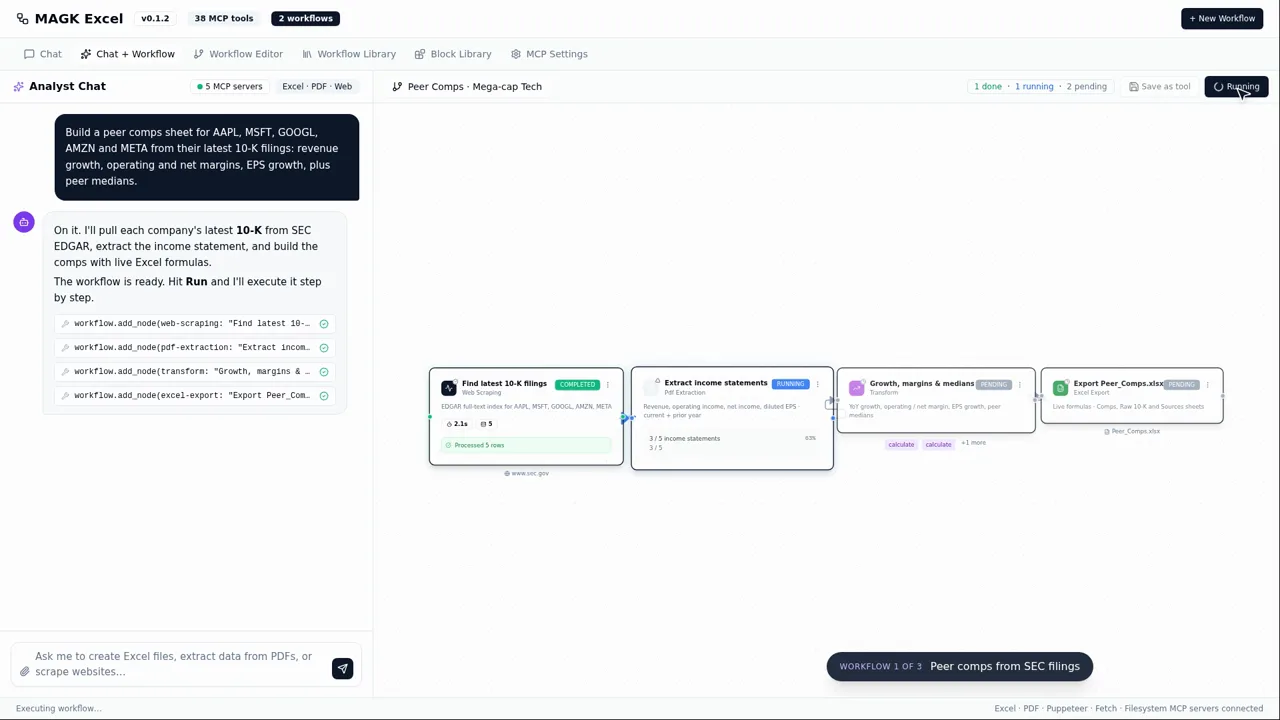

MAGK Excel is built for people who live inside spreadsheets but hate the tedious data-wrangling that surrounds the actual analysis. Instead of coding or clicking through dozens of tools, you simply describe what you want in plain English:
“Grab the quarterly revenue table from Tesla’s investor relations page, combine it with the Q3 PDF report in my downloads, and give me an Excel chart of revenue by segment.”
MAGK Excel interprets that request and creates an automation workflow to do it, end-to-end.
The Problem
Financial analysts, operations folks, and business analysts waste hours every week on repetitive data tasks:
- Manually copying numbers from PDF reports into Excel.
- Scraping the same websites for updated tables (and often doing it by hand or with brittle scripts).
- Running the same data cleanup and formatting steps for weekly or monthly reports.
- Constantly explaining their data needs to engineers or IT, because they can’t build tools themselves.
They don’t want to learn Python or write VBA macros. They just want the data in Excel, cleaned and ready, without the grunt work.
How MAGK Excel Works
Natural Language Workflow Creation – Instead of programming, users describe their data task in plain language (like the Tesla example above). MAGK Excel uses an LLM (via Amazon Bedrock) to parse this into a structured workflow config.
Multi-Stage Cloud Pipeline – Once the workflow is defined, MAGK Excel orchestrates several stages (mostly serverless on AWS):
- Web Scraping – If data needs to be pulled from a website, a Selenium-driven headless browser fetches the page and extracts the requested table or info.
- PDF Parsing – If the task involves a PDF, we use PyMuPDF (MuPDF) to extract text and tables from the document.
- Data Transformation – The workflow might specify operations like “filter for 2023” or “calculate growth rates”. Under the hood, an AWS Lambda (via Chalice) runs Python/pandas code to perform those transformations.
- Excel Generation – Finally, the processed data is written into an Excel file using openpyxl, with formatting or charts as requested. The finished file is delivered to the user.
Reusable Workflows – A key difference from one-off “ChatGPT answers” is that MAGK Excel saves these workflows. If you’ll need that Tesla vs. PDF revenue chart every quarter, you now have a button that does it in one click. It’s like building your own mini-app on the fly, which you can re-run or tweak later.
Security & Control – All workflows run in the user’s own AWS space (or offline mode) to ensure sensitive data isn’t sent to unknown third-parties. Users see each step before execution, and a “dry run” mode can show what data will be pulled/changed without actually writing the Excel, to build trust.
Technical Architecture
Desktop Client: A PyQt desktop application serves as the GUI. This is where users input their instructions, edit saved workflows, and trigger runs. It also manages auth (e.g. Google OAuth for access to Google Drive if needed) and settings.
LLM Orchestration: We use Amazon Bedrock to handle the translation from natural language to a structured JSON workflow definition. This involves prompt templates that describe our DSL for tasks (like “source:website, action:scrape, url:X, selector:Y” etc.).
Serverless Backend: Each step of the workflow is mapped to an AWS Lambda function via AWS Chalice. One function handles scraping, one handles PDF parsing, one handles data transforms, etc. This keeps things scalable and modular.
Automation Tools:
- Selenium for web scraping (running in a headless Chrome Lambda layer).
- PyMuPDF for PDF extraction.
- Pandas for data manipulation.
- openpyxl for writing Excel files.
Workflow Storage: Workflows are saved as JSON (locally and optionally to a cloud backup). They can be version-controlled or shared among team members by exchanging the JSON.
Why This Matters
Teams run on Excel. But getting data into Excel is often a mess of manual effort or waiting on someone else. MAGK Excel empowers non-engineers to automate their own workflows in the tools they already use (web, PDF, Excel) just by describing what they need. It’s like giving every analyst their own junior data engineer who can churn through the boring parts.
In an era of fancy dashboards and AI, a huge amount of critical work still happens in spreadsheet files. MAGK Excel doesn’t fight that reality — it embraces it, making the humble spreadsheet a lot smarter and the people who use it a lot more efficient.
Current Status
Actively developed under the MAGK organization. The core engine and several connectors (web, PDF, Excel) are functional in our alpha version. We’re adding more data source integrations (databases, internal APIs) and refining the LLM parsing accuracy for complex instructions. We have also begun pilot testing with industry analysts – for example, customizing MAGK Excel for a finance team at an Asian securities firm, to validate the tool on real investment reports and gain feedback. This collaboration is shaping our security and compliance features as well.